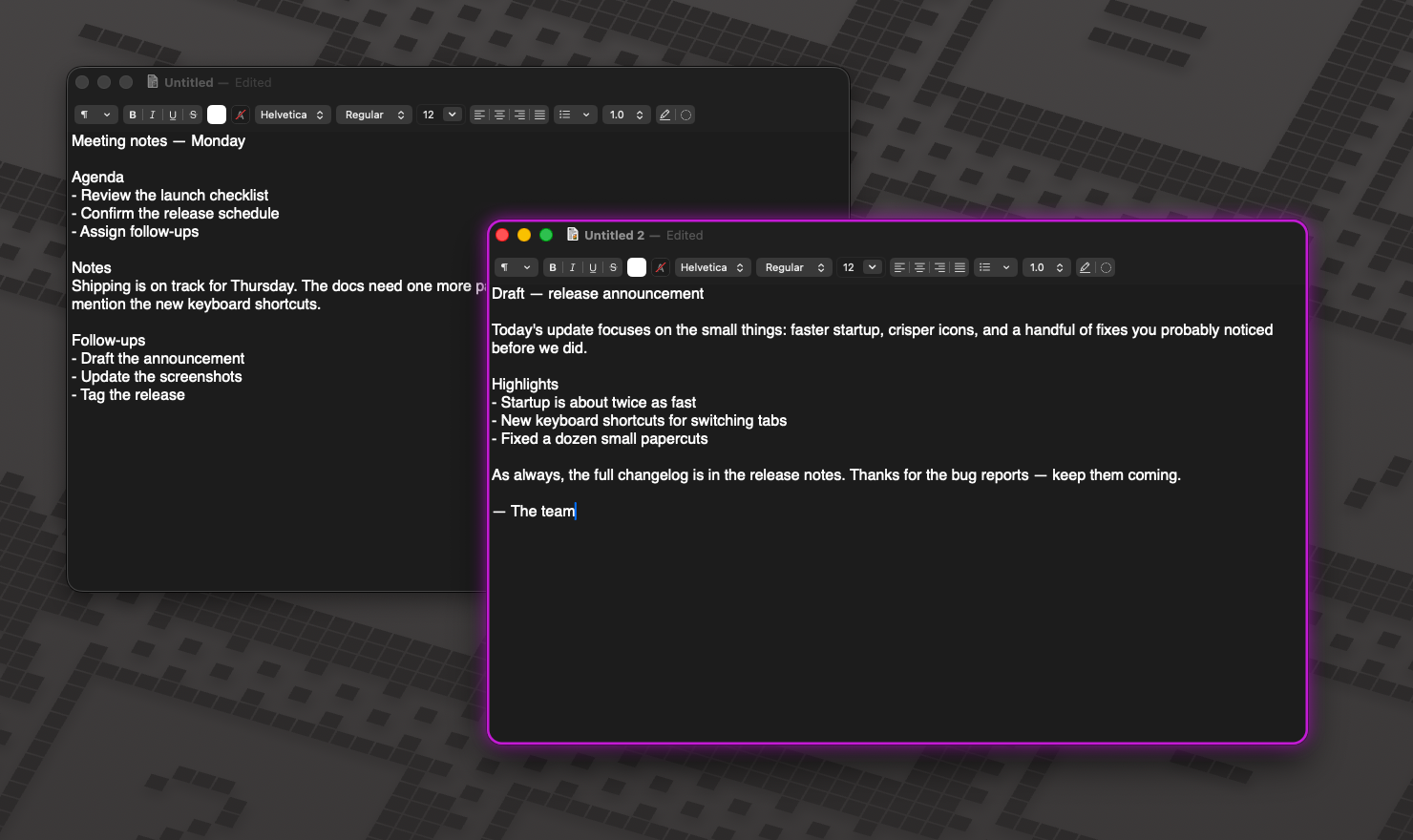
Ever typed a message into the wrong window? On a big display full of similar dark windows, macOS barely shows which one is active. InFocus highlights it — border, glow, tint, dim, or pulse — so you always know where your keystrokes will land.
7-day full-featured trial · No card required · macOS 13+ (Apple silicon)
Every effect is independently toggleable and colorable, straight from the menu bar. Use one, or stack them.
A crisp colored outline around the focused window. Pick the color and width — it follows the window smoothly at 60 Hz while you drag and resize.
A soft halo radiating from the window's edges. Adjustable radius and intensity — subtle enough to live with, visible enough to catch from the corner of your eye.
A translucent color band over the active window's title bar. InFocus measures each window's real title-bar height, so compact bars and tall tab strips both look right.
Fade everything except what you're working on — across all displays, with adjustable strength. Dim the whole screen, or only the apps you choose.
A brief expanding ring the instant focus changes or you switch Spaces — your eye lands on the right window before you type a single character.
One shared accent color drives every effect, with quick presets in the menu and per-effect overrides in Settings. Quick toggles live in the menu bar; the full Settings window (⌘,) has color pickers and sliders for everything, plus Launch at Login and an optional global shortcut (⌃⌥⌘F).
InFocus is a small Swift/AppKit app that does one thing well — no Electron, no accounts, no analytics.
Pure AppKit overlays that are click-through and never steal focus. It sits in the menu bar and stays out of the way — no dock icon, no windows to manage.
Tracks focus through macOS itself — Accessibility events plus the window server — so highlights follow drags at 60 Hz, survive Space switches, and work on every display.
No analytics, no account, nothing phoned home. The Accessibility permission is used to read window positions only — never window contents, never keystrokes.
Developer ID signed and notarized, so Gatekeeper opens it without warnings. Distributed outside the App Store because sandboxed apps can't use the Accessibility API.
Checks for signed updates via Sparkle and installs them in place. Every update is free — buy once, keep getting improvements.
Ultrawide, multi-monitor, a wall of terminals — the more windows you juggle, the more InFocus earns its place. Also a real help if subtle focus cues are hard to see.
Try everything free for 7 days — just download, no card, no sign-up. Keep it if it sticks.
Checkout, taxes, and billing are handled by Dodo Payments, our merchant of record. Prefer to try first? Download the trial.
Download the app and use everything for 7 days — no card, no account, no sign-up. When the trial ends, the highlights pause until you enter a license key. Nothing is deleted and your settings are kept, so buying later picks up right where you left off.
Checkout takes a minute on Dodo Payments' secure page, and your license key arrives by email immediately. Paste it into InFocus (menu bar → License) and you're done. One key activates up to 3 Macs; you can deactivate a Mac from within the app to free up a slot.
InFocus needs the macOS Accessibility API to find window positions, and App Store sandboxing forbids that API — for every app of this kind, not just ours. Instead, InFocus is signed with an Apple Developer ID and notarized by Apple, so macOS verifies it before it runs.
Window positions and sizes — that's what it reads, so it can draw the highlight in the right place. It does not read window contents, text, or keystrokes, and there's no code in the app that could send any of that anywhere.
No. There are no analytics and no accounts. The app makes exactly two kinds of network calls: validating your license key with Dodo Payments (the key plus your Mac's device name), and checking GitHub for app updates. Details are in the privacy policy.
The trial exists so you can find out for free. If you bought it and changed your mind, email support@mattmade.ai within 14 days for a refund — see the refund policy.
Virtually all of them. A few apps that don't expose their windows properly through Accessibility (some Java and Electron apps) may highlight late or not at all — the 7-day trial is the honest way to check your setup.
macOS 13 Ventura or later on an Apple silicon Mac, plus the Accessibility permission (InFocus walks you through granting it on first launch).
Free for 7 days. Yours for $9.99.